Hello, World!
If you have seen any kind of computer programming before, you are probably aware of a quite famous program called “Hello, World!”.
Here it is in APL:
⎕←'Hello, World!'
If you have learned programming before, maybe it is strange to have gotten so far in an introductory tutorial without meeting the language’s “print” function.
i
Note:
By default, non-assignment expressions output results to the session log. We strongly recommend using ⎕← when you deliberately intend for an expression to print to the session log. You are then able to search for print statements for easier debugging.
Back 2 School 4 Maths
The function Test will ask the user n single-digit arithmetic questions, and return the number of correct answers.
     ∇ points←Test n;answer;solution
[1]    points←0
[2]    :While n>0
[3]        solution←⍎⎕←⍕(?10),('+-×÷'[?4]),?10
[4]        answer←⎕
[5]        points+←answer≡solution
[6]        n-←1
[7]    :EndWhile
[8]    ⎕←'You scored',points,'points'
     ∇

      Test 3
Examine the Test function and try it out. Which line asks for user input?
i
Note:
The ∇ del representation of the Test function above is the vector representation result of ⎕VR'Test' which can be copied and pasted directly into the session.
You will see that it is quite possible to cheat the Test function by entering the same expression that it asks. To be even more sly, simply move the text cursor with the up arrow to the printed problem statement and press Enter.
To ameliorate this, we can verify and fix input with ⎕VFI. Also note the use of quote-quad ⍞.
     ∇ points←Test2 n;answer;input;solution;valid
[1]    points←0
[2]    :While n>0
[3]        solution←⍎⎕←⍕(?10),('+-×÷'[?4]),?10
[4]        input←⍞
[5]        (valid answer)←⎕VFI input
[6]        answer←valid/answer
[7]        points+←answer≡,solution
[8]        n-←1
[9]    :EndWhile
[10]   ⎕←'You scored',points,'points'
     ∇

      Test2 3
System Functions
So ⎕ and ⍞ can be used for input and output. However, there are also the so-called quad-names which all have a name beginning with ⎕.
Some quad-names are constants, such as ⎕A, ⎕D and ⎕AV. Others are system-functions, many of which are similar to system command counterparts.
| System Command | System Function |
|---|---|
)SAVE /path/to/WorkspaceFile |
⎕SAVE'/path/to/WorkspaceFile' |
)LOAD /path/to/WorkspaceFile |
⎕LOAD'/path/to/WorkspaceFile' |
)ERASE name |
⎕EX'name' |
In contrast to the system commands, which can only be used in the interactive session, system-functions can be used in a function (A.K.A. under program control).
Native Files
The term “Native Files” refers to any type of file on a hard disk. These can be text or media files, or even executable files.
i Note: This section requires some particular files which can be downloaded from https://github.com/rikedyp/APLWorkshop/data
As a simple example, here we tie the file words.txt, read the data and store it in a variable, and finally untie the file.
      tn←'data/words.txt'⎕NTIE 0
      words←(⎕UCS 10)(≠⊆⊢)⎕NREAD tn 80 ¯1
      ⎕NUNTIE tn ⋄ ⎕EX'tn'
Text Files
Generally the ⎕N... family of system functions are for reading and writing native files as described in the documentation. ⎕NGET and ⎕NPUT are useful for reading and writing text files without having to tie and untie them.
      (⊂words)⎕NPUT'data/words.txt'                      ⍝ Write words to a unicode text file
      (content encoding newline)←⎕NGET'data/words.txt'   ⍝ Read words from a unicode text file
      words←(⎕UCS newline)((~∊⍨)⊆⊢)content               ⍝ Split words on each new line
Dyalog has some system functions for dealing with some popular file types. These are ⎕CSV, ⎕XML and ⎕JSON. ⎕XML and ⎕JSON are particularly useful for communicating via the internet and with web browsers.
Indian Summer
'IndiaRainfall.csv' is a file of comma separated values. It is adapted from 'IndiaRainfallSource.csv' to remove incomplete records.
The India Meteorological Department(IMD) has shared this dataset under Govt. Open Data License - India. It can be downloaded from the Kaggle data science website but is also part of the GitHub repository for this course.
The data contains the total measured monthly rain fall in millimeters for 30 regions in India from the years 1915 to 2015 inclusive.
-
Load the data into the workspace
By default,
⎕CSVwill load all fields as text data:⎕←3↑1 2↓⎕CSV'data/IndiaRainfall.csv'With the following parameters,
⎕CSVwill try to interpret all fields as numeric, and fall back to text if this fails. It will also import the first line as a separate array:(raindata header)←⎕CSV'data/IndiaRainfall.csv' ⍬ 4 1 ⎕←3↑0 2↓raindata - What was the total rainfall in Punjab in 1995?
- Which month in which region had the highest rainfall?
- Use a least squares linear fit to estimate the total rainfall in all 30 regions in 2018
- Use a least squares linear fit to estimate the total rainfall in Pubjab in 2018
Hint:
No one would expect you to derive an expression for the least squares linear fit with little APL experience. If you have done it, kudos to you. The expression
Mv(⊢⌹1,∘⍪⊣)Nvfrom APLcart will compute coefficients of a least squares linear fit given a vector of X valuesMvand a vector of Y valuesNv. - Inspect the data in IndiaRainfallSource.csv to see how close the true values were to your estimates. Were they within your standard error?
Hint:
If the error
eis a vector of the differences between Y values predicted by the linear fit and the actual Y values , then an estimate for the variance is given by
 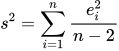 where the standard deviation (standard error) is
 s.
Fun facts
If you are not very familiar with the workings of modern software, you might be surprised to see how accessible file types are. Many text editors might try to open a wide range of files by interpreting their data as text. In the audio editing program Audacity, native files can be inspected and manipulated as audio waveforms. These are a couple of techniques used in an art style called databending.